

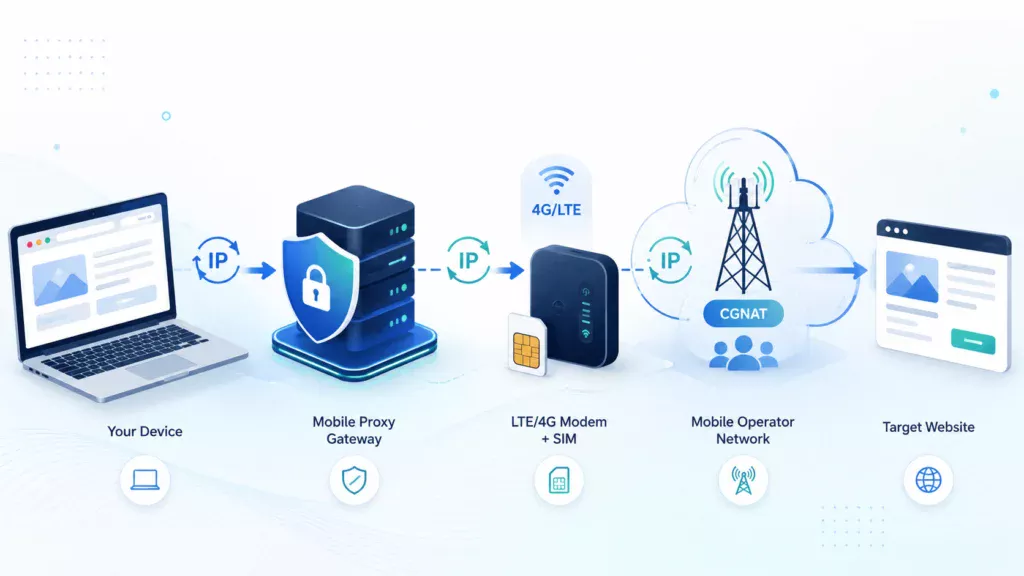
Datacenter proxies typically use IP addresses that belong to hosting providers or data centers. These addresses can be identified through their ASN and network range, so some websites treat them with greater caution. Mobile proxies work differently: traffic passes through a SIM card, an LTE modem, and a mobile operator’s network, while the target resource sees a public IP address assigned by that operator.
What Are Mobile Proxies?
A mobile proxy is an intermediary server that routes user traffic through a mobile modem, SIM card, or mobile operator gateway. The target website sees the external IP address of the mobile network rather than the user’s original IP address.
The connection looks like this:
user → proxy server → LTE modem → mobile operator network → target website
This setup involves three addresses: the user’s original IP address, the proxy gateway address, and the operator’s public IP address.
A proxy hides the original IP only when configured correctly. It does not guarantee complete anonymity, as a resource may also analyze cookies, authentication data, DNS requests, WebRTC, browser fingerprints, and user behavior.
How Does a Mobile Proxy Work?
The user enters the proxy address, port, username, password, and protocol in the application. The server verifies the credentials and routes traffic through a mobile modem.
A modem with a SIM card registers on the operator’s network in much the same way as a smartphone. The operator routes the connection through its own infrastructure and forwards it to the internet. As a result, the website sees the mobile operator’s IP address rather than the IP of the user’s home internet provider or a data center.
An IP address is only one of many signals. Websites may also analyze cookies, tokens, browser headers, request frequency, and the previous history of the IP address.
What Role Do 4G and LTE Play?
LTE is a mobile broadband technology that operators commonly market as 4G. The term 4G describes a generation of mobile networks, while LTE refers to a specific technology used within that generation.
The modem detects the network, authenticates through the SIM card, and establishes a data session. The external IP address may be assigned by the operator’s NAT gateway rather than directly to the modem.
Connection speed depends on signal quality, modem hardware, antenna quality, base station load, the route to the target website, and server load. For this reason, 4G does not guarantee a fixed speed, and a mobile proxy should be tested at different times of day.
What Is CGNAT?
CGNAT, or Carrier-Grade Network Address Translation, is an address translation system that allows many subscribers to share a limited pool of public IPv4 addresses.
A device inside the operator’s network receives a non-public address. CGNAT replaces it with the operator’s public IP address, assigns a port to the connection, and routes the response back to the correct subscriber.
Many users may share the same public address. Blocking that address can affect unrelated subscribers, although CAPTCHAs, rate limits, and other restrictions are still possible.
CGNAT does not provide absolute anonymity. It does not clear cookies, change browser fingerprints, hide logged-in accounts, prevent DNS or WebRTC leaks, or override the rules of the target service.
How Does IP Rotation Work?
IP rotation means reconnecting the mobile channel or switching the outgoing node, after which the operator may assign a different public IP address.
Rotation can be triggered manually through the dashboard, through a dedicated link, automatically on a timer, or through an API if the service supports it.
During rotation, active TCP connections are usually interrupted. A new operation should therefore be started only after the network connection has been restored.
The operator may return the previous IP address or assign another address from the same pool. IP rotation is not intended for bypassing bans or violating platform rules.
Mobile, Residential, and Datacenter Proxies
| Criterion | Mobile Proxies | Residential Proxies | Datacenter Proxies |
|---|---|---|---|
| IP source | Mobile operator | Home internet provider | Data center or VPS |
| Speed | Depends on signal quality | Depends on the endpoint | Usually high |
| Rotation | Modem reconnection | Address change within a pool | Static IP or server pool |
| Cost | Higher | Medium or high | Lowest |
A mobile proxy is appropriate when an operator-assigned IP, mobile network origin, and controlled address rotation are important.
If the target resource works normally with datacenter IP addresses and the main requirements are maximum speed or a static address, a cheaper datacenter proxy is often sufficient.
What Are Mobile Proxies Used For?
Mobile proxies are used for legitimate tasks that require testing a resource from a mobile operator’s network, including:
- testing websites and applications;
- checking local language, prices, contact details, and redirects;
- monitoring mobile search results;
- verifying the display of your own advertising;
- conducting marketing research;
- monitoring prices and publicly available information;
- testing integrations and permitted automation.
A proxy does not override robots.txt, API restrictions, website rules, or personal data protection requirements.
Advantages and Limitations
The main advantages of mobile proxies are operator-assigned IP addresses, controlled rotation, genuine mobile network routing, and support for HTTP(S) and SOCKS5.
At the same time, mobile proxies cost more than datacenter proxies, depend on signal quality, may experience speed fluctuations, and can temporarily disconnect during rotation. A mobile IP address does not guarantee the absence of CAPTCHAs or blocking.
How to Choose and Test a Mobile Proxy
Before purchasing, check:
- whether the access is private or shared;
- the country, ASN, and mobile operator;
- the minimum rotation interval;
- whether IP changes can be controlled through a dashboard, link, timer, or API;
- support for HTTP(S), SOCKS5, and UDP;
- speed, latency, and traffic limits;
- equipment stability;
- availability of a trial period and technical support.
During testing, verify the IP address, country, and operator using at least two independent services. Measure ping, download speed, and upload speed, and test long sessions, IP rotation, DNS, and WebRTC behavior.
MSOCKS Mobile Proxies
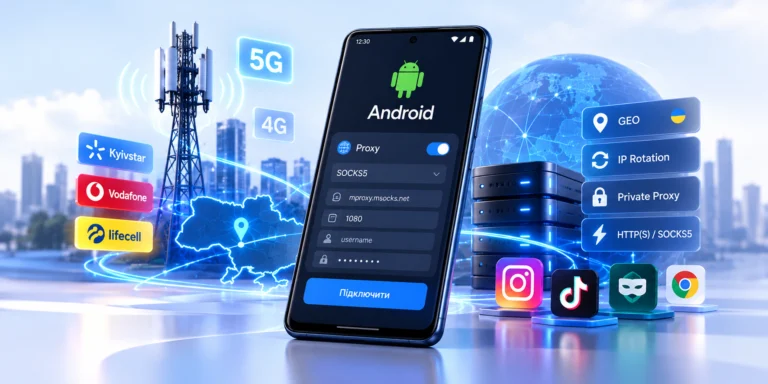
MSOCKS provides private Ukrainian mobile proxies with IP addresses from Kyivstar, Vodafone, and Life. Each proxy access is assigned to a separate client, so the channel is not shared with other customers.
The service supports HTTP(S), SOCKS5, and UDP, multi-threaded connections, and traffic without volume limits. The IP address can be changed through the personal dashboard, through a dedicated link, or automatically using a timer. According to the website, rotation can be triggered at intervals starting from 30 seconds.
The dashboard displays active proxies, rental periods, and connection details. The advertised speed starts at 30 Mbps, while selected plans offer 50+ Mbps. Actual performance depends on the operator, signal quality, and network route.
MSOCKS is suitable for users who need Ukrainian mobile operator IP addresses, a private channel, controlled rotation, support for multiple proxy protocols, and unlimited traffic.
Conclusion
Mobile proxies route traffic through a SIM card, LTE modem, and mobile operator network. CGNAT allows many subscribers to share public IPv4 addresses, but it does not guarantee anonymity or protection from blocking.
A mobile proxy is worth choosing when operator-assigned IP addresses, mobile network origin, and controlled rotation are essential. For simple technical requests, a datacenter proxy is often sufficient.
The most reliable way to evaluate a service is to test a specific operator, protocol, and real-world use case before purchasing.