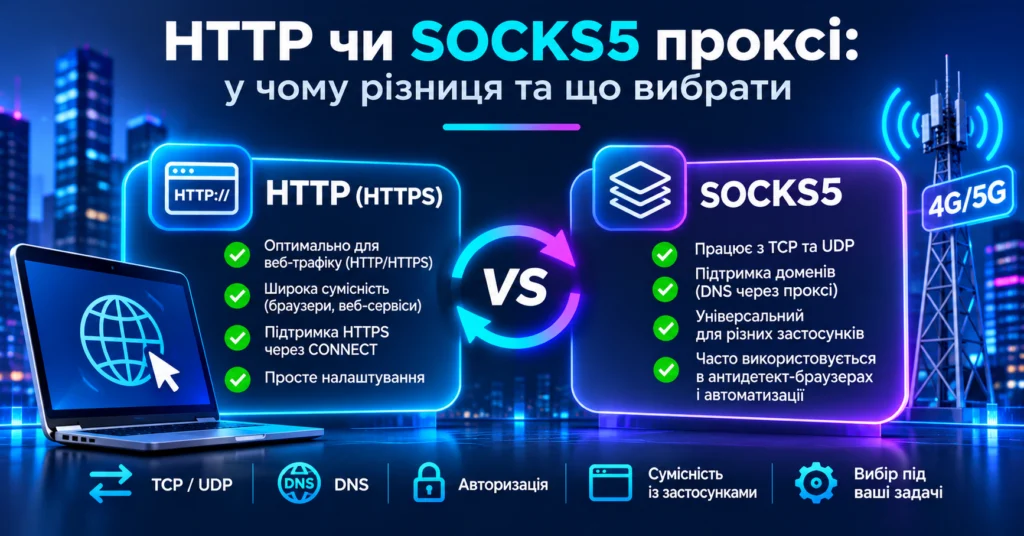
When configuring a mobile or traditional proxy, users often have to choose between HTTP(S) and SOCKS5.
SOCKS5 is sometimes presented as the automatically “better” or more advanced option. In practice, the correct protocol depends on the application, traffic type, DNS requirements, and the actual workflow.
For browsers, web applications, APIs, SEO tools, and standard HTTP/HTTPS workflows, an HTTP proxy is often sufficient. SOCKS5 becomes useful when software directly supports it, when a more general transport proxy is required, or when UDP support is necessary.
This guide explains the real differences between HTTP and SOCKS5 proxies, including TCP, UDP, DNS, authentication, HTTPS tunneling, compatibility, and performance.
What Is an HTTP Proxy?
An HTTP proxy receives web requests from a client and forwards them to the destination server.
A simplified flow is:
Client → HTTP Proxy → Website
HTTP proxies are commonly used for:
- web browsers;
- web applications;
- SEO tools;
- GEO QA;
- landing-page testing;
- web automation;
- HTTP and HTTPS APIs.
Can an HTTP Proxy Handle HTTPS?
Yes.
A common misconception is that an HTTP proxy can only access unencrypted HTTP websites.
For HTTPS destinations, HTTP proxies commonly use the CONNECT method.
The client can send a request such as:
CONNECT example.com:443 HTTP/1.1
If the proxy accepts it, it establishes a TCP connection to the target and then relays traffic in both directions.
The flow becomes:
Browser → HTTP Proxy → CONNECT tunnel → HTTPS Website
TLS can then operate through that tunnel.
What Does “HTTPS Proxy” Mean?
The term HTTPS proxy can be confusing.
Sometimes it is used informally for an HTTP proxy that supports HTTPS destinations through CONNECT.
More technically, it can mean that the connection from the client to the proxy itself is protected with TLS.
Always check the provider and client documentation rather than assuming the meaning from the label alone.
What Is a SOCKS5 Proxy?
SOCKS5 is a proxy protocol that operates below the HTTP application layer.
Instead of understanding HTTP requests, it provides a transport-oriented proxy connection between the client application and the destination.
A simplified flow is:
Application → SOCKS5 Proxy → Destination
SOCKS5 supports:
- TCP;
- UDP;
- IPv4;
- IPv6;
- domain-name addressing.
This makes SOCKS5 useful for specialized applications and software that need a proxy layer beyond ordinary web requests.
HTTP vs SOCKS5 Proxy: Key Differences
| Feature | HTTP Proxy | SOCKS5 |
|---|---|---|
| Main focus | HTTP/web traffic | Transport-oriented proxying |
| HTTP | Yes | Yes, over TCP |
| HTTPS | Yes, commonly via CONNECT | Yes |
| TCP | Yes for supported proxy workflows | Yes |
| UDP | Not with a traditional HTTP proxy | Supported by the SOCKS5 protocol |
| Browser compatibility | Very common | Depends on browser/client |
| Specialized software | Application dependent | Commonly supported |
| DNS | Client-dependent | Can be local or proxy-side |
Is SOCKS5 Faster Than HTTP?
Not necessarily.
Real proxy performance is usually affected more by:
- distance to the proxy;
- network routing;
- mobile carrier quality;
- server load;
- latency;
- packet loss;
- proxy infrastructure;
- the destination service.
A high-quality HTTP proxy with a good route can easily outperform a poorly routed SOCKS5 endpoint.
Choose the protocol based on compatibility and requirements, not the assumption that SOCKS5 is always faster.
DNS With HTTP and SOCKS5
DNS determines who translates a hostname such as:
example.com
into an IP address.
The lookup can be performed by the local device, the proxy client, or the proxy server.
DNS With SOCKS5
SOCKS5 supports domain-name addressing, which allows a client to pass the hostname to the proxy.
However, actual behavior depends on the client.
curl provides a useful example:
socks5:// can resolve the hostname locally.
socks5h:// asks the SOCKS5 proxy to resolve the hostname.
Therefore, using SOCKS5 does not automatically guarantee proxy-side DNS resolution.
DNS With an HTTP Proxy
With HTTP proxying, destination hostnames are typically passed as part of the HTTP request or CONNECT target.
However, the complete DNS behavior can still depend on the browser, operating system, DoH configuration, client implementation, and additional network requests.
For that reason, DNS should be tested after the proxy is configured.
Does SOCKS5 Support UDP?
Yes.
The SOCKS5 standard defines UDP ASSOCIATE.
However, protocol support does not guarantee that every SOCKS5 provider or every client implements UDP.
The full chain must support it:
Client → SOCKS5 UDP support → Proxy server → Destination workflow
Authentication
Both HTTP and SOCKS5 proxies can require authentication.
A common connection format is:
host:port:username:password
HTTP Proxy Authentication
HTTP proxies can use proxy authentication mechanisms such as the Proxy-Authorization header.
SOCKS5 Authentication
SOCKS5 negotiates an authentication method when the connection is created.
Depending on the server, this may include no authentication, username/password, or another supported method.
When Should You Use an HTTP Proxy?
Browser Workflows
HTTP(S) is often the simplest choice for:
- web browsing;
- website testing;
- landing pages;
- GEO QA;
- SEO tools;
- web dashboards.
If your software officially supports HTTP proxies and only needs web traffic, switching to SOCKS5 may provide no practical advantage.
Android Wi-Fi Proxy
Android’s standard Wi-Fi proxy settings are primarily designed around HTTP proxy configuration.
SOCKS5 generally requires a dedicated proxy application or another client.
Web-Based QA
HTTP(S) is often sufficient for:
- GEO testing;
- landing-page verification;
- localization;
- redirect testing;
- mobile-web QA.
When Should You Use SOCKS5?
When the Application Directly Supports SOCKS5
SOCKS5 is a good choice when the software is specifically designed to use it.
It is common in:
- proxy clients;
- automation tools;
- anti-detect browsers;
- desktop software;
- specialized network applications.
When UDP Is Required
If a legitimate workflow requires UDP and both the client and proxy implementation support SOCKS5 UDP ASSOCIATE, SOCKS5 may be required.
When You Need a More General Transport Proxy
SOCKS5 is not limited to HTTP request semantics, so it can be useful for software that needs proxying for different TCP-based workflows.
HTTP or SOCKS5 for Mobile Proxies?
The proxy protocol and the origin of the IP address are separate properties.
The same mobile proxy infrastructure may expose:
HTTP(S) → Mobile carrier IP
and:
SOCKS5 → Mobile carrier IP
Using SOCKS5 does not make an IP “more mobile,” and using HTTP does not make it less mobile.
Mobile identity comes from the carrier network, ASN, and exit infrastructure.
HTTP vs SOCKS5 for SEO
Both protocols can work for SEO and rank-tracking systems.
If the SEO tool already supports HTTP proxies, HTTP may be completely sufficient.
SOCKS5 becomes relevant when the tool directly supports it, when proxy-side DNS is required, or when the automation architecture is designed around SOCKS.
The protocol itself does not improve Google rankings or automatically make SERP data more accurate.
More important factors include:
- GEO;
- ASN;
- carrier;
- connection stability;
- session logic;
- request methodology.
What Should You Use With MSOCKS?
MSOCKS provides Ukrainian mobile proxy connections with support for HTTP(S) and SOCKS5/UDP, along with controlled IP rotation. Current MSOCKS materials list Kyivstar, Vodafone, and lifecell/Life carrier networks.
| Workflow | Good Starting Point |
|---|---|
| Browser | HTTP(S) |
| Landing-page QA | HTTP(S) |
| SEO tool | Protocol officially supported by the tool |
| Android Wi-Fi | HTTP |
| Android proxy app | HTTP or SOCKS5 |
| AdsPower / GoLogin / Dolphin | HTTP or SOCKS5 after testing |
| UDP workflow | SOCKS5 if both sides support UDP |
Common HTTP vs SOCKS5 Mistakes
“SOCKS5 Is Always Faster”
Not necessarily. Routing, latency, carrier quality, server load, and destination performance usually matter more.
“HTTP Proxy Cannot Handle HTTPS”
It can. HTTP proxies commonly use CONNECT to create a tunnel to HTTPS destinations.
“SOCKS5 Automatically Hides DNS”
Not always. DNS behavior depends on the client.
“SOCKS5 Encrypts Traffic”
SOCKS5 itself is not a general encryption protocol.
Application-layer encryption, such as HTTPS, is normally provided by TLS.
“HTTP and Mobile Proxy Mean the Same Thing”
HTTP and SOCKS5 describe the proxy access protocol.
Mobile, residential, and datacenter describe the origin of the exit network.
How to Test Both Protocols
- Connect using HTTP.
- Check IP, GEO, ASN, and carrier.
- Measure latency.
- Test download and upload.
- Check DNS behavior.
- Run your actual workflow.
- Repeat the same process using SOCKS5.
- Compare results.
Choose the protocol that works most reliably with your actual software and workflow.
FAQ
Which Is Better: HTTP or SOCKS5?
Neither is universally better. HTTP(S) is often simpler for web workflows, while SOCKS5 is useful for software that directly supports it or needs UDP.
Can an HTTP Proxy Work With HTTPS?
Yes. HTTP proxies commonly use a CONNECT tunnel for HTTPS destinations.
Does SOCKS5 Support UDP?
Yes. SOCKS5 defines UDP ASSOCIATE, but the proxy provider and client must both implement it.
Does SOCKS5 Encrypt Traffic?
SOCKS5 itself is not a general-purpose encryption layer. HTTPS traffic remains encrypted through TLS.
Is SOCKS5 Faster?
Not necessarily. Network quality, routing, latency, server load, and destination performance usually have a larger impact.
Does DNS Go Through SOCKS5?
It can, but the client must pass the hostname to the proxy. Some clients resolve DNS locally first.
Which Protocol Is Better on Android?
HTTP is easier with standard Wi-Fi proxy settings. SOCKS5 usually requires a dedicated proxy app.
Does the Protocol Change Whether an IP Is Mobile?
No. A mobile IP remains a mobile carrier IP whether you access the proxy through HTTP or SOCKS5.
Conclusion
There is no universal winner in the HTTP vs SOCKS5 proxy comparison.
HTTP(S) is often the simplest choice for browsers, web applications, SEO tools, landing-page QA, and other web-based workflows.
SOCKS5 is useful when software directly supports it, when a broader transport proxy is required, or when UDP support is needed.
The practical rule is simple:
choose the protocol your software properly supports and verify it under real working conditions.
After connecting, check:
IP → GEO → ASN → Carrier → DNS → Speed → Stability → Rotation